
• Home
  • Articles
  • About
  • Contact
  • Privacy Policy
Login
HomeServer Homarr Installation

Homarr Installation

admin on April 5, 2026
2 Min Read

Homarr is a lightweight, open-source, browser-based dashboard designed to centralize and manage self-hosted applications, services, and bookmarks in one place. It features a drag-and-drop interface, over 30 integrations (e.g., Plex, Docker), real-time status monitoring, and user authentication, making it popular for managing homelabs.

Today I will go through how to install it on my home nas “ugreen” docker.

Hardware Prerequisites

At least 500MB RAM
At least 600MB of free disk space for the Docker image. SSD is preferred.
Single or dual core CPU

1. Create homarr folder

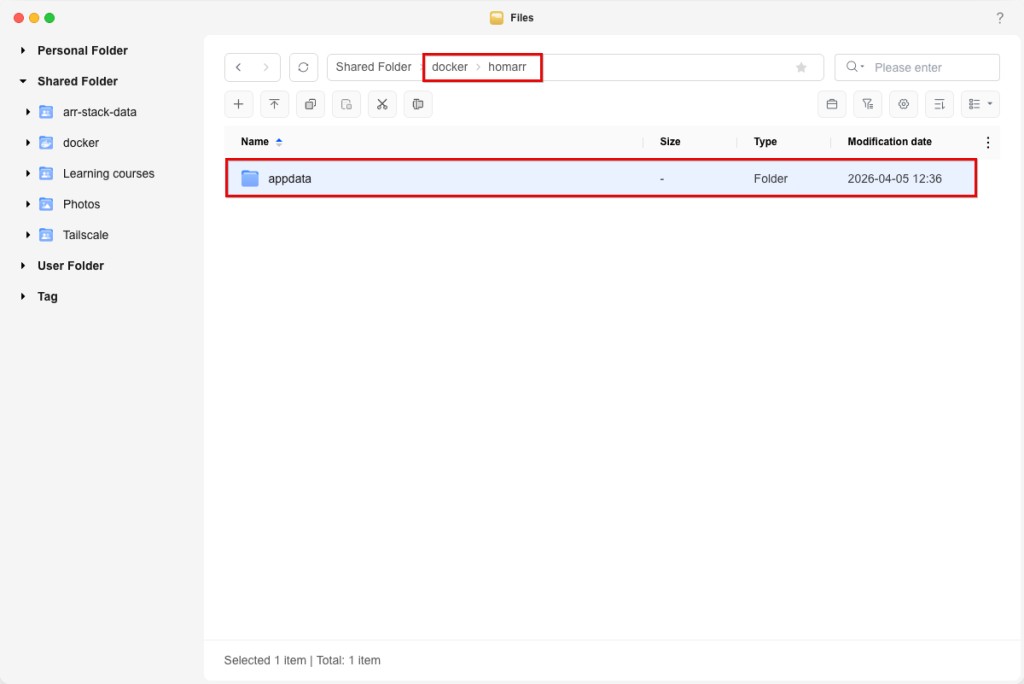
Navigate to shared folder > docker. create homarr folder and create appdata as subfolder.
2. Create docker compose

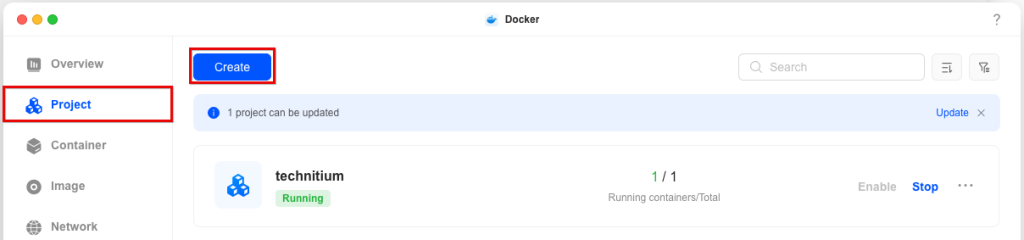
Open Docker App, Navigate to Project and click on Create
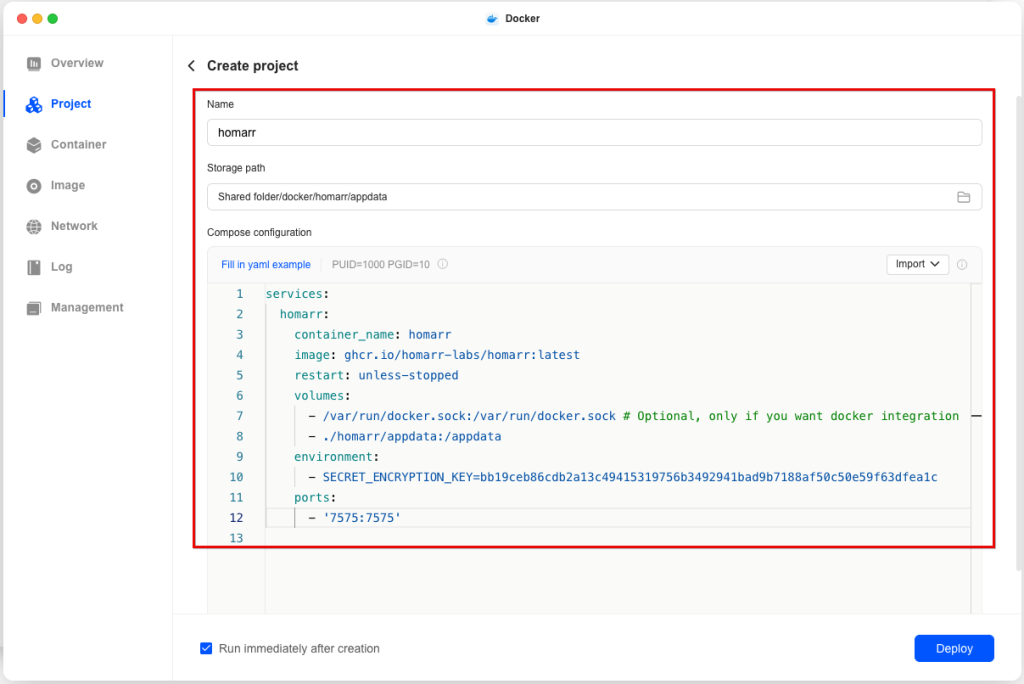
Configure your project name, select storage path “Shared folder/docker/homarr/appdata” and paste docker compose configuration. Note: docker compose configuration can be found at https://homarr.dev/docs/getting-started/installation/docker
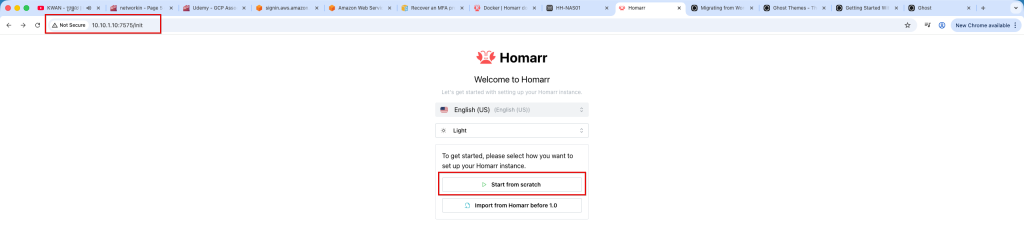
Click Deploy to deploy cotainer. once cotainer deployer. open browser and navigate to https://server-ip:7575 and click on Start from scratch if it is your first installation. Optionally you are able to import from your old homarr server by clicking on Import from Homarr
Configure Admin username and password

Once admin user configured. on Sever setting, you have option to opt out crawling and indexing. Click on Continue to configure server setting. I prefer to opt-out everything because it will be used for my home server only.

Installation completed.

admin on April 5, 2026 Server
previous article
Next article

Leave a comment Cancel reply

Your email address will not be published. Required fields are marked *

Subscribe to our Newsletter

We’ll send you nice letter once per week. No spam.

Welcome to the SecureSubnet Blog WordPress Theme – your space for fresh ideas, insightful stories, and practical tips. Whether you’re looking to learn something new, spark inspiration, or simply enjoy thoughtful reading, you’ve come to the right place.

Facebook X-twitter Instagram Linkedin Youtube

categories

  • Article
  • Privacy Policy

how to find us

Seattle, WA, United States

[email protected]

© 2026 — SecureSubnet. All Rights Reserved.

Manage Consent
To provide the best experiences, we use technologies like cookies to store and/or access device information. Consenting to these technologies will allow us to process data such as browsing behavior or unique IDs on this site. Not consenting or withdrawing consent, may adversely affect certain features and functions.
Functional Always active
The technical storage or access is strictly necessary for the legitimate purpose of enabling the use of a specific service explicitly requested by the subscriber or user, or for the sole purpose of carrying out the transmission of a communication over an electronic communications network.
Preferences
The technical storage or access is necessary for the legitimate purpose of storing preferences that are not requested by the subscriber or user.
Statistics
The technical storage or access that is used exclusively for statistical purposes. The technical storage or access that is used exclusively for anonymous statistical purposes. Without a subpoena, voluntary compliance on the part of your Internet Service Provider, or additional records from a third party, information stored or retrieved for this purpose alone cannot usually be used to identify you.
Marketing
The technical storage or access is required to create user profiles to send advertising, or to track the user on a website or across several websites for similar marketing purposes.
  • Manage options
  • Manage services
  • Manage {vendor_count} vendors
  • Read more about these purposes
View preferences
  • {title}
  • {title}
  • {title}
Back to top